


The problem nobody talks about in customer success: Slack overload and how to deal with it

You manage a large portfolio of accounts. Every client has their own Slack channel. Every day, things happen in those channels. Issues get flagged. Decisions get made. Blockers appear.
Most of them you never see.
Not because you don't care. Because there are 100+ channels you need to monitor and you have many other priorities. That's not a communication tool. That's a firehose.
For a long time, I accepted this as the cost of doing business in CS. You catch what you catch. You rely on your team to escalate. You hope nothing falls through the cracks.
Then I started using AI agents to do the reading for me.
What I Built
I wrote a prompt that runs every morning and does one thing: reads every client channel and tells me what happened in the last 24 hours. It's not complicated. Here's how it works.
Step 1: Read every channel
The agent reads up to 50 messages from each client channel. If a message has an active thread, it reads the thread too, going back up to 7 days. It does this across every channel simultaneously.
This alone would take me 45 minutes to do manually. The agent does it in under two minutes.
Step 2: Identify what matters
For each channel with activity, the agent writes one entry. Two things only:
What happened (decisions, updates, status changes)
What's at risk (blockers, escalations, customer concerns)
If nothing is at risk, it says so. No filler. No summaries of irrelevant chatter. Just signal.
Step 3: Post the digest
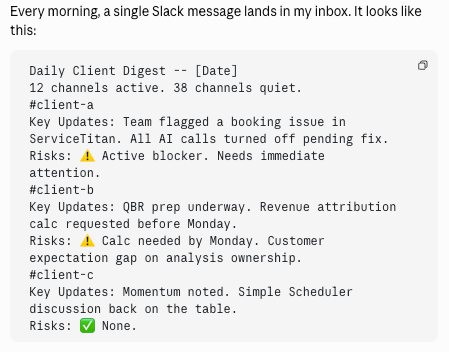
Every morning, a single Slack message lands in my inbox. It looks like this:
Daily Client Digest -- [Date]12 channels active. 38 channels quiet.
#client-a
Key Updates: Team flagged a booking issue in ServiceTitan. All AI calls turned off pending fix.
Risks: ⚠️ Active blocker. Needs immediate attention.
#client-b
Key Updates: QBR prep underway. Revenue attribution calc requested before Monday.
Risks: ⚠️ Calc needed by Monday. Customer expectation gap on analysis ownership.
#client-c
Key Updates: Momentum noted. Simple Scheduler discussion back on the table.
Risks: ✅ None.
That's it. One message. Thirty seconds to read. Complete situational awareness.
Getting a step ahead
The problem in CS isn't that we don't have enough information. It's that we have too much, scattered across too many places, and no systematic way to process it.
A good CSM catches issues early. A great CSM never misses one. But catching everything manually at scale is impossible. This really helps me as a CS leader as well. Instead of hoping my team escalates the right things, I see everything. Instead of reacting to problems after they blow up, I spot them the day they appear. It also changes how I run my 1:1s. Instead of asking "anything I should know about?" I show up already knowing. The conversation starts at a higher level.
How to Build One Yourself
You don't need to be technical. You need three things:
An AI agent with access to your Slack workspace
A list of the channels you want monitored (I just took screenshots of the channels I wanted to monitor and pasted in Claude when creating the prompt.
A clear prompt that tells it what to look for and how to report it
The prompt I use is about 250 words. The key design decisions:
Focus on the last 24 hours. More than that and the digest gets noisy.
Two fields only: updates and risks. Adding more fields dilutes the signal.
Skip quiet channels entirely. If nothing happened, don't mention it. Save the reader's attention for what matters.
Use a consistent format. Bold channel names. Clear labels. Emoji indicators for risk status. Scannable in seconds.
Here is the exact prompt
As I mentioned, I took a screenshot of the exact channels I wanted to track to speed this process up or you can add them manually where it says [List all of the channels]. You also need to decide where you want this to post the information. I have it post in a Slack channel I created. You can also have it send you an email.
NOTE: You need to have a connector (MCP) between your AI tool and Slack.
Here is the prompt:
You are a daily client channel digest agent for Avoca. Read recent Slack messages from internal client channels, identify key updates and risks, and post a concise digest to #[Slack Channel you choose]
STEP 1: Read each channel listed below. Use slack_read_channel with a limit of 50 messages per channel. Focus on the last 24 hours. For active threads, use slack_read_thread to get context up to 7 days back.
Public channels: [List of the Slack channels]
Private channels: [List of the Slack channels]
STEP 2: For each channel with activity, write one entry:
**#channel-name**Key Updates: [what happened, decisions made, status changes]
Risks: [escalations, blockers -- or "✅ None" if clean]
Use ⚠️ prefix on Risks if there are real blockers. Keep entries to 2-4 lines. No filler. No em-dashes.
STEP 3: Post to #[Slack Channel you choose] using the message parameter. Header format:
**Daily Client Digest -- [Today's Date]**[X] channels active. [Y] channels quiet.
Split into (1/2) and (2/2) if over 4000 characters.
Getting this setup
The hardest part isn't writing the prompt. It's resisting the urge to make it do too much.
What I'm describing is a new kind of CS infrastructure. Not dashboards. Not reports. A live, intelligent layer sitting between your team's activity and your attention.
Your team does the work. The agent watches it all. You see what matters.
That's not replacing human judgment. It's freeing it up for the decisions only you can make.
What would you do with an extra hour every morning?


Comments